

memberOf in Entra ID is being phased out: Do you know where you’re using it?
You may have already heard that Microsoft is discontinuing the memberOf rule operator for dynamic groups in Entra ID as of November 3, 2026. But what many administrators don’t realize is where they actually use it.
This is no coincidence. memberOf was never part of the standard rule interface for dynamic groups in Entra ID, but only available in the advanced rule editor. This is the free-text mode that you really should only use if you know exactly what you’re doing. Many of these rules were created years ago, often by administrators who are no longer with the company.
Index
A quick reminder: What’s happening on November 3, 2026
Microsoft is ending the public preview of the memberOf operator. Dynamic groups that use this operator will no longer be automatically updated after that date. Membership will remain at the last calculated state. New members will no longer be added, and members who have left will still be included.
Why this affects so many administrators
memberOf was popular because it solved a very specific problem: merging multiple existing groups into a single umbrella group without having to maintain membership information twice.
Here are a few examples that might sound familiar to you:
Permission groups. You have “Sales Mexico,” “Sales USA,” and “Sales Canada” – and at some point, there was a request for a “Sales Overall” group. Using memberOf, this group was automatically created from the three country groups. New employees simply had to be added to their respective country group; the rest happened automatically.
License management. Several role-based groups – “SAP Users,” “CRM Users,” “Power BI Users” – were consolidated into a single “Business Applications” group, through which licenses were then automatically assigned. Microsoft itself explicitly cites group-based license assignment as a typical use case for memberOf.
Conditional Access. Instead of adding individual users to CA policies, collective groups such as “Third-Party Users” were formed from “External Consultants,” “Service Providers,” and “Freelancers,” and MFA or compliance policies were then applied to them. Fewer CA rules thus led to a more consistent security logic.
Teams and SharePoint access. Several functional groups, such as “Project Management,” “Construction Management,” and “Construction Site Coordinators,” were automatically placed in a shared team, such as “Project X Team.” This was also handled via memberOf.
Access Packages and Governance. Groups such as “Internal Auditors,” “Data Protection Officers,” and “Compliance Officers” were consolidated into a “Governance Community.” They became available in Access Packages and Access Reviews.
Replicating nested AD groups. Probably the most common reason of all for using memberOf: Anyone accustomed to a structure like “Employees → Sales / Marketing / IT” from traditional Active Directory could use memberOf to build a sort of cloud-based version of it without having to manually maintain each membership individually.
Do any of these scenarios sound familiar? Then it’s worth taking the next step.
The script: Find first, then act
Before you make any changes, you should know exactly which areas are affected.
➡️ That’s exactly why we’ve developed a PowerShell script that we’re making available for free.
The script scans your entire Entra ID tenant for all objects that use the soon-to-be-phased-out memberOf operator. It was important to us that you could use it with minimal effort:
- No additional PowerShell modules – you don’t need to install anything extra
- No separate Azure App Registration – no setup, no admin consent process, no waiting for approvals
- Three output formats – the results appear directly in the console, as well as in a clear HTML report and as a CSV export for further processing
Here’s what the HTML report looks like in practice:
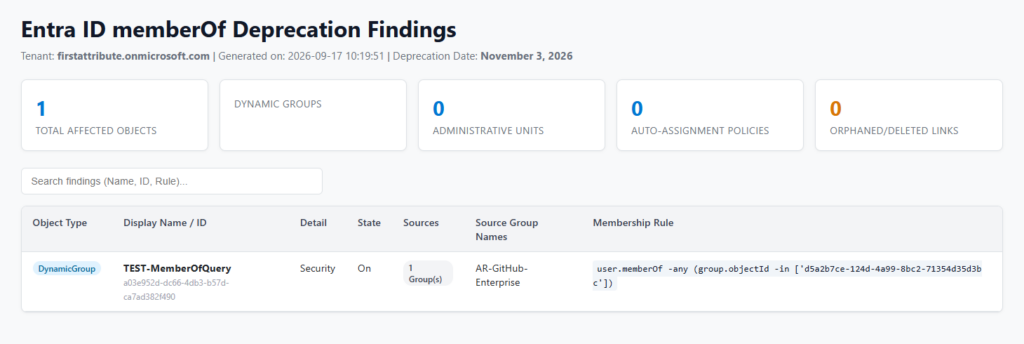
At a glance, you can see how many objects are affected, what type they are, and (particularly handy) which membership rule applies to them, without having to click through the rule editor for each individual group yourself.
Download memberOf-Script
"*" indicates required fields
Our solution: Synchronize group members with DynamicSync
Now you know where you’re affected. The actual work of restructuring the affected rules before November 3 still remains. For by far the most common case – a collective group consisting of several existing groups – there’s a significantly simpler option than manually recreating the logic.
Group synchronization with our SaaS solution DynamicSync automatically handles what memberOf has done up to now:
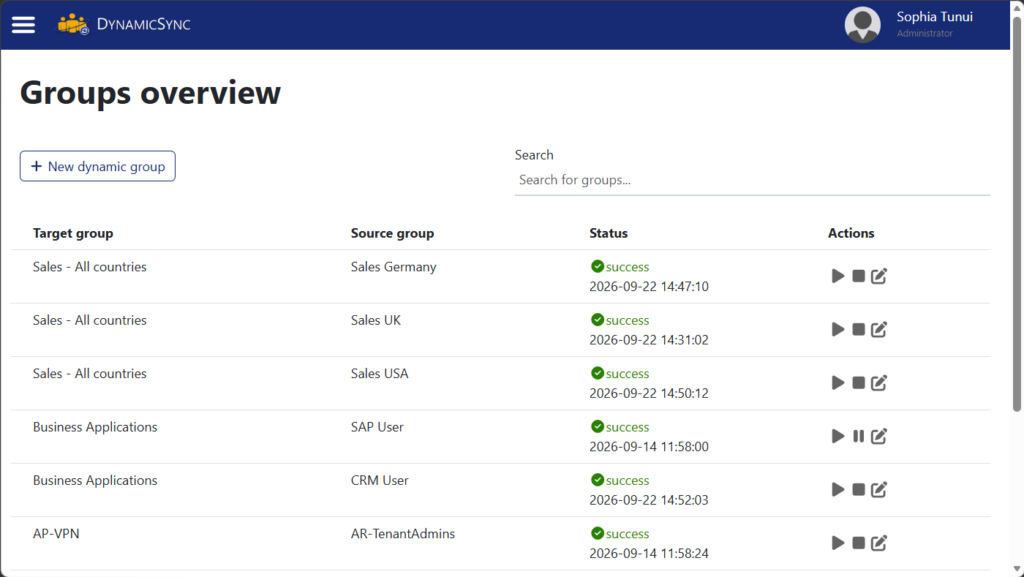
For “Sales – All countries”, simply set up a separate sync job for each country group:
- “Sales Germany” → “All countries”,
- “Sales UK” → “All countries”,
- “Sales USA” → “All countries”.
Each job runs automatically and continuously, without requiring you to manually maintain membership. For cases that additionally target user attributes such as department, location, or language, dynamic filters are also available. In short: The script gives you an overview, and DynamicSync then automatically handles ongoing maintenance.
Conclusion
No one could have expected that the memberOf operator would be available forever. A preview feature remains just that – a preview. Those who knew about the rule in the advanced editor used it anyway, for lack of an alternative. Now Microsoft is discontinuing this operator, and good advice is hard to come by.
We offer you a concrete approach. First, use our script to identify which dynamic groups are affected. Then, feel free to test our DynamicSync solution, which enables 1:1 synchronization between Entra groups and covers many use cases for the memberOf operator.
Synchronize Entra ID groups with each other – Try it now
 DynamicSync is an automation solution from FirstAttribute AG for cloud groups. As a pure cloud service (SaaS), DynamicSync specializes in dynamic and automatic group synchronization in Entra ID.
In addition to the free online demo, our friendly staff is also available by phone to answer any questions you may have. Give us a call at +49 81 969 984 330.