

Why hybrid IT group management without automation becomes expensive
Hybrid IT group management is now standard in many companies. The combination of on-premises Active Directory (AD) and cloud services like Entra ID enables modern collaboration with Microsoft 365, Microsoft Teams, and SharePoint.
However, this flexibility also brings a new challenge:
Groups and permissions must be managed across two worlds: on-premises and in the cloud.
Many IT teams therefore face the same tasks every day:
- Maintaining AD groups,
- Replicating the same groups in Entra ID,
- Regularly synchronizing members,
- Ensuring that permissions in Microsoft 365 remain correct.
This double maintenance is time-consuming and prone to errors.
In this context, the need for “automation” is often mentioned. However, the term does not indicate where to start, and “automate everything” is not a strategy. The crucial step is to first identify which processes in group management should actually be automated.
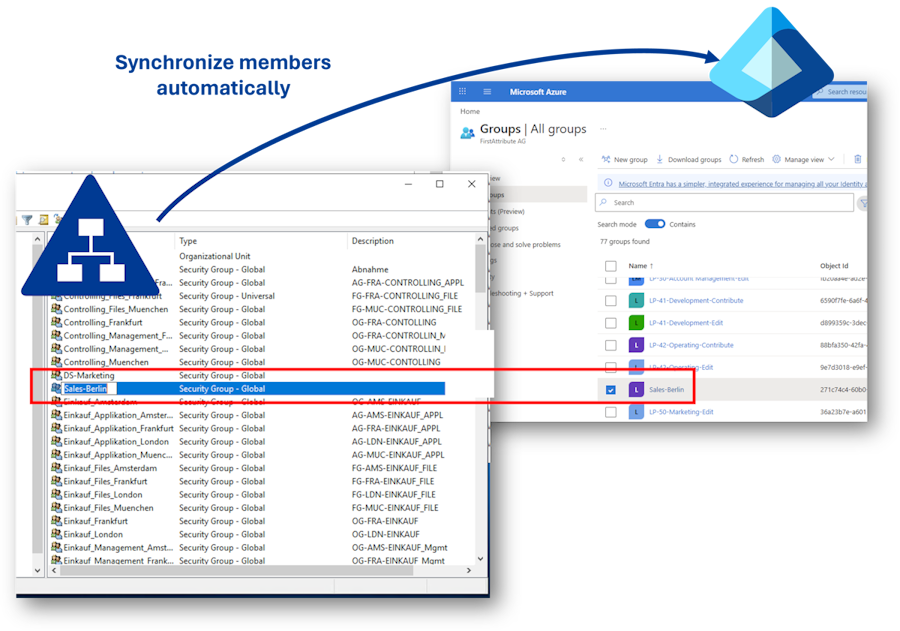
In hybrid Microsoft environments, there are three typical scenarios.
Index
Three typical processes that can be automated in hybrid group management
Instead of trying to automate all processes, it is worthwhile to specifically identify those that cause the most administrative effort. In practice, these are usually three areas.
1. Making AD Groups Usable in Microsoft 365
Many companies already use Entra ID Connect to synchronize users and groups from AD to the cloud. This creates so-called AD-synced groups. These groups have limitations:
- Members cannot be quickly and directly added to Entra ID groups.
- They cannot be synchronized into M365 groups.
- They also cannot be directly used for Teams.
Practical problem:
An AD group named “Sales-Berlin” already exists for internal permissions. If a Microsoft Teams team is needed, a new cloud group must be created and members manually transferred.
Without automation, IT must: create cloud group → transfer members from AD → regularly update changes.
Solution:
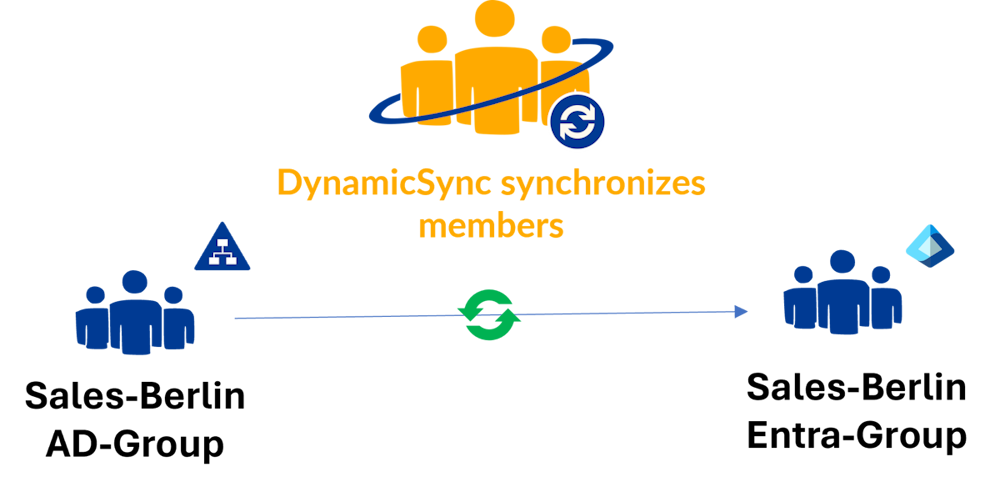
➡️ DynamicSync, our automation solution (SaaS) for cloud groups, solves this problem by automatically transferring members of AD-synced groups into Entra ID groups.
Example:
AD-synced group “Sales-Berlin” → Entra ID group “Sales-Berlin-M365” → DynamicSync synchronizes members regularly.
The cloud group can be used directly for Teams, SharePoint, or other M365 resources.
Benefit: New employees appear automatically in the cloud group without additional manual steps.
2. Automating Group Memberships Based on Attributes
Many groups are based on clear organizational rules:
- Department
- Location
- Language
- Cost center
Practical problem:
Still, members are often maintained manually. This leads to delayed access for new employees and incorrect permissions when employees change departments.
Solution:
➡️ Automation solutions like DynamicSync use user attributes to dynamically manage memberships.
Example rule:
Department = Sales Office = Berlin
→ The user is automatically added to the group “Sales-Berlin”.
Benefits:
- Less manual work
- Permissions are always correct
- New employees are immediately in the right groups
3. Using Groups as Central Control for Access
In Microsoft 365, groups not only organize users but also control their access to resources.
A group can, for example, simultaneously control access to:
- MS Teams teams
- SharePoint sites
- Microsoft 365 groups
- Security groups
Practical problem in hybrid environments:
The group structure in AD and Entra ID is often not identical.
Typical situations:
A user is added to a group in AD but does not get access to Teams. An employee leaves a department but retains access to cloud resources.
Solution:
➡️ Automated group processes ensure that changes automatically affect all connected resources.
Example:
The group “Sales-Berlin-M365” is linked to a Teams team and a SharePoint site. New members get automatic access, and departing members are automatically removed.
Benefits:
- Less administrative effort
- Reduced security risks
- Consistent access rights
The solution: automation in hybrid IT group management
The answer to these challenges is therefore: automation.
With tools like DynamicSync, companies can manage their groups efficiently and error-free, without manual interventions and without costly additional licenses.
What Does DynamicSync Do?
- Synchronizes AD-synced groups into Entra ID groups,
- Dynamic filters for attribute-based assignment (e.g., department, location, language),
- Regular, scheduled synchronizations for up-to-date data,
- Support for M365 and security groups.
The result is less effort, fewer errors, and lower costs.
Practical example: AD Group members should have dynamic access to MS Teams
Imagine a company with around 500 employees. The IT environment is hybrid: user accounts and groups exist both in on-premises AD and in Entra ID in the cloud.
The challenge: The sales department should have access to Microsoft Teams and certain M365 resources.
Until now, IT had to manually:
- Maintain sales employees in AD groups,
- Replicate these groups in Entra ID, and
- Create Teams groups manually and assign permissions.
With DynamicSync, this process runs automatically:
- The synchronized AD group “Sales” is defined as the source group.
- DynamicSync regularly synchronizes this group into a target group in Entra ID.
- Additional criteria can be applied via dynamic filters, e.g., location “Berlin” or language “de-DE”.
- The synchronized cloud group is linked directly to a Microsoft Teams team, including all permissions for files, SharePoint, and apps.
- Result: New sales employees are automatically added in AD and appear immediately in the corresponding Teams group.
😥Before: Several hours per month spent on maintenance and checks.
🙂After: With DynamicSync, processes are automated.
Your benefits:
- Time savings: less manual work
- Cost savings: no additional license costs
- Security: error rate is almost zero
Best practices for hybrid IT group management
To ensure automation works optimally, companies should follow some basic rules:
- Define clear roles and responsibilities: Who can create, modify, or delete groups?
- Regularly review the group structure: Even automated systems need oversight.
- Maintain attributes cleanly: Dynamic filters only work if data quality is correct.
- Follow security policies: Automation must not create open access rights.
- Use monitoring: Tools like DynamicSync provide status messages and logs for full transparency.
Conclusion
Manual group management causes hidden costs, ties up resources, and increases the risk of errors. This should be avoided. It no longer meets the requirements of modern IT.
Hybrid IT environments are now standard in many companies. Due to their growing complexity, they remain efficient and cost-effective only with automation. Especially in permission management, it is important to maintain oversight, making automation in this area particularly relevant.
Our proposed solution for you: automated synchronization of cloud groups with DynamicSync.
More about DynamicSync
 DynamicSync is an automation solution from FirstAttribute AG for cloud groups. As a pure cloud service (SaaS), DynamicSync specializes in dynamic and automatic group synchronization in Entra ID.
Our IAM experts are also happy to answer your questions by phone. Call us at +49 81 969 984 330.