• DynamicSync for Entra ID
  • DynamicGroup for AD
    • Department Groups
    • OU Groups
    • Delegation
    • Pricing
  • Try it now
    • DynamicSync for Entra ID
    • DynamicGroup for AD
  • Company
    • About us
    • News
  • Contact
  • English
    • German
FirstWare DynamicGroupFirstWare DynamicGroup
Group Automation
in Entra ID and Active Directory
  • DynamicSync for Entra ID
  • DynamicGroup for AD
    • Department Groups
    • OU Groups
    • Delegation
    • Pricing
  • Try it now
    • DynamicSync for Entra ID
    • DynamicGroup for AD
  • Company
    • About us
    • News
  • Contact
  • English
    • German

Easily resolving nested groups

Feb 19, 2019 (Letztes Update) |


We talk about nested groups when an AD group has other groups as members. How should one proceed to read out their members without having to open each group?

Index

  • Changes dynamically updated
  • View all group members
    • AD data always up to date
  • About DynamicGroup 2018

FirstWare DynamicGroup software enable you to resolve nested groups within seconds.

Changes dynamically updated

With DynamicGroup, if members of the nested groups change, these changes are dynamically updated. There are only members in the “final group” who are also in the “members groups”. Even if “members groups” change.
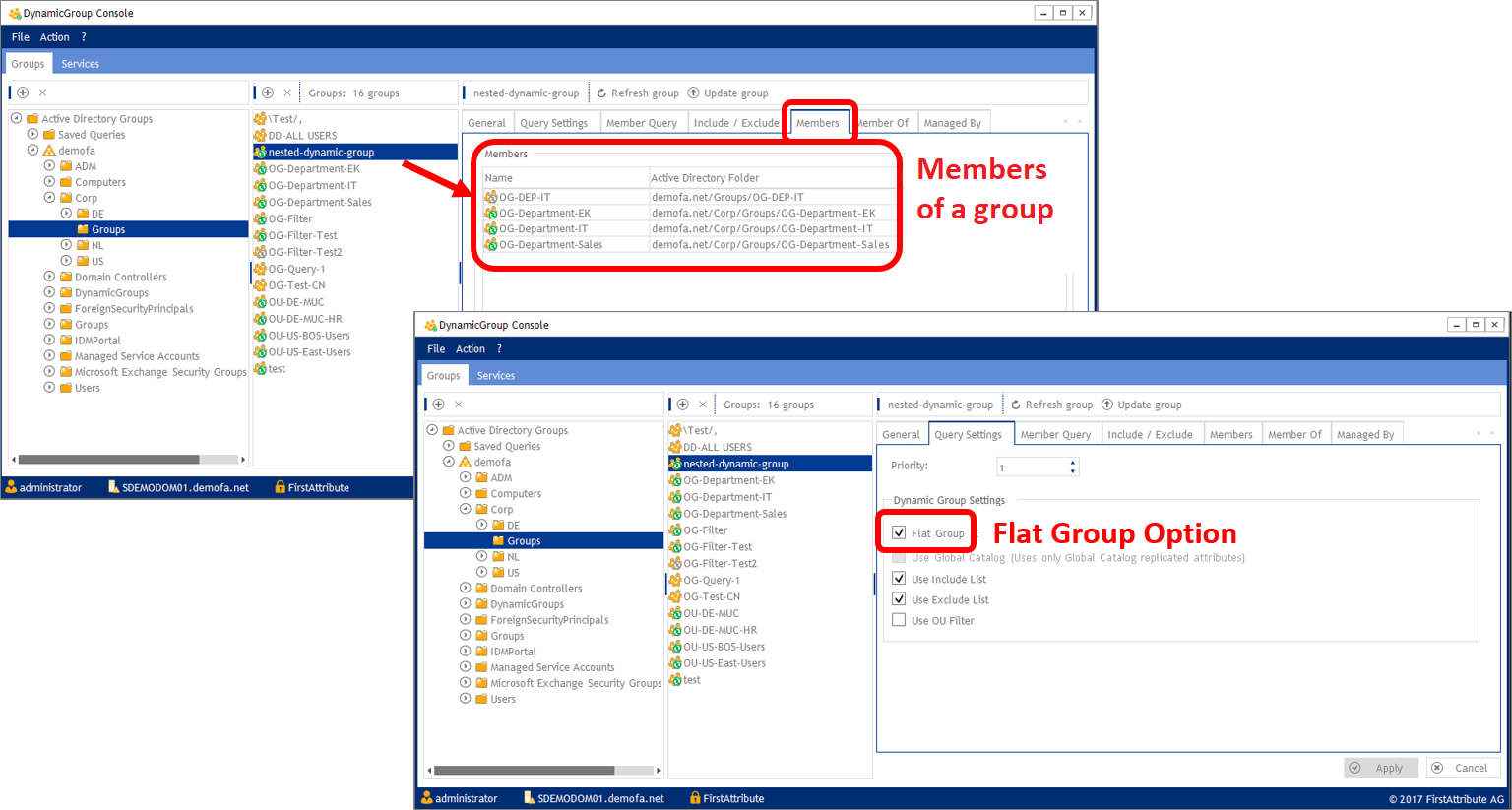
View all group members

With the “Flat Group” feature you can disentangle all groups which are members of an AD group. Thanks to DynamicGroup, you will be able to resolve nested groups and only display the actual members (users) of a group:
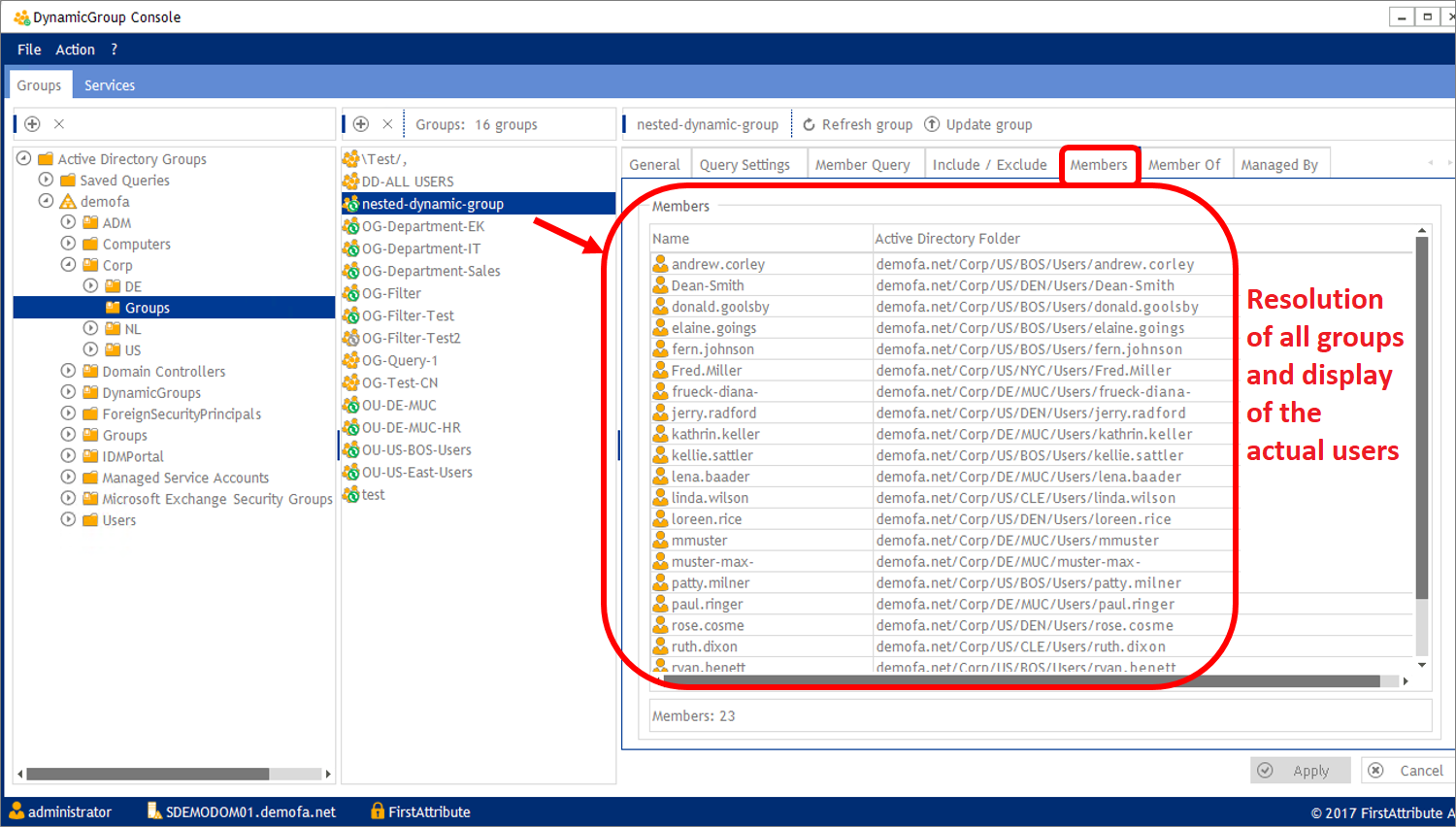
AD data always up to date

Thanks to this option you can operate faster and always stay up to date. As its name implies, the software creates dynamic groups which instantly reflect all the changes in AD.

About DynamicGroup 2018

DynamicGroup is a proven product which has been used for many years now by a steadily growing customer base.

FirstWare DynamicGroup is a software application to automate group memberships in Active Directory. Group members are dynamically assigned to a group based on AD attributes (like department), OUs, combined LDAP filters and more.

Download a 30 days trial version and further information

Artikel erstellt am: 18.02.2019
Share

You also might be interested in

Understanding Microsoft Entra ID P1 and P2 licenses

Jul 31, 2025

Updated: August 2025 – Companies that use Microsoft Entra ID[...]

Synchronize Dynamic Groups in Entra ID – Release of DynamicSync

Sep 16, 2021

With DynamicSync for Entra ID, FirstAttribute provides you with a[...]

Major Release DynamicGroup 5 – Fast management of large AD groups

Mar 7, 2023

In the new major release DynamicGroup 5, performance has been[...]

Search

Recommended Posts

  • Group types in Microsoft Entra ID: differences, use, and synchronization
  • Automate file server permissions
  • Understanding Microsoft Entra ID P1 and P2 licenses
  • Automated Groups in Microsoft Entra ID: Practice, Licensing, and Limitations
  • M365 groups – 5 frequently asked questions, simply explained

Contact Info

  • FirstAttribute AG
  • Am Büchele 18, 86928 Hofstetten, Germany
  • +49 81 969 984 330
  • https://www.firstattribute.com/

Topics

  • Dynamic Groups in Active Directory
  • Department Groups
  • OU Groups
  • Legal Information
  • Privacy policy
  • Terms & Conditions

Latest News

  • Group types in Microsoft Entra ID: differences, use, and synchronization
  • Automate file server permissions
  • Understanding Microsoft Entra ID P1 and P2 licenses
  • Automated Groups in Microsoft Entra ID: Practice, Licensing, and Limitations
  • M365 groups – 5 frequently asked questions, simply explained

© 2025 · FirstAttribute AG.

  • Dynamic Groups in Active Directory
  • Department Groups
  • OU Groups
  • Legal Information
  • Privacy policy
  • Terms & Conditions
Prev Next