

Dynamic distribution lists in an Exchange hybrid environment: How to successfully automate group maintenance
Many companies currently find themselves in this situation: Their infrastructure is hybrid – one foot is already firmly planted in Microsoft Entra ID, the other in traditional Active Directory. In theory, this sounds like the natural course of events, as times change and companies must adapt.
In practice, however – especially when migrating Exchange – IT departments run into a major problem: managing distribution groups in hybrid environments. The problem stems from a combination of a lack of automation, technical incompatibility, and the loss of familiar features.
In the following article, we break down this topic and show you how to make distribution groups dynamic using DynamicGroup.
Index
Manually managing group members and the end of public folders
This is particularly challenging for companies that have grown over time and have maintained their distribution lists in Public Folders. As part of the Exchange migration to the cloud, many are finding that:
- Microsoft no longer recommends Public Folders and recommends using M365 groups.
- The familiar structures often no longer function smoothly in a cloud environment.
- The manual effort required to correctly assign group members skyrockets due to the lack of automation based on attributes.
Lack of dynamization: The core problem in a hybrid deployment
The biggest pain point in Exchange migration is the inability to easily dynamize distribution groups in a hybrid environment. Administrators need to correctly assign group members based on attributes (such as department, location, or cost center) to eliminate the need for manual maintenance.
This becomes particularly critical for companies that have previously used distribution lists in public folders. Since Microsoft considers public folders to be deprecated and they no longer function as usual in the cloud, IT teams face a dilemma: Manual maintenance of static lists is error-prone and time-consuming, but true automation often seems out of reach in the hybrid world.
Native dynamic lists cannot be expanded
Anyone who tries to solve this problem using the built-in tools in Microsoft Entra ID immediately runs into the next obstacle: The dynamic distribution lists there cannot be expanded.
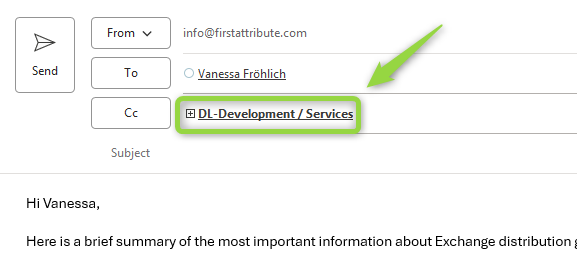
In Outlook, users cannot click the “plus” icon on these lists to view the members. For IT and business departments, this is often a deal-breaker. While you want the “Development” group to stay up to date automatically, you also need to be able to see who’s included in it. Since Microsoft’s standard distribution lists don’t offer this transparency, they’re simply unusable for many business scenarios.
The solution: DynamicGroup as a bridge in hybrid environments
This is where DynamicGroup comes into play. Our software enables full dynamization of your distribution groups in hybrid environments without sacrificing familiar functionality.
Why DynamicGroup is the key component for your migration:
- Attribute-based automation: DynamicGroup uses existing AD attributes to automatically and accurately assign group members.
- Full transparency (expandability): Since we work with “real” group objects, the lists in Outlook remain fully expandable. IT retains control, and the user can see who receives the email.

- A true replacement for Public Folders: We offer a modern way to cleanly replace outdated public folder structures and convert them into dynamic, easy-to-maintain groups.
- Supports all scenarios: Whether it’s flat group topics or complex filter options, DynamicGroup handles every scenario that native tools cannot manage.
Conclusion
Migrating to Exchange Online is the right move, but it shouldn’t result in a step backward for your administration. Administrators naturally expect automation to kick in and make things easier. Unfortunately, in practice, some things simply become more complex.
If you’re looking for automation that works in day-to-day practice and lightens your administrative load, DynamicGroup is the ideal solution. This software solution brings order to your hybrid environment and ensures that your distribution lists automatically reach exactly the right people.
Dynamic groups in Active Directory

DynamicGroup for AD is a tool for automated group management in Active Directory. With our software solution, you get, among other things, attribute- and OU-based group memberships, bulk and smart group creation, flexible search and filter functions, and much more.
In addition to the free download for testing, our friendly staff is also available to assist you by phone. Give us a call at +49 81 969 984 330.